
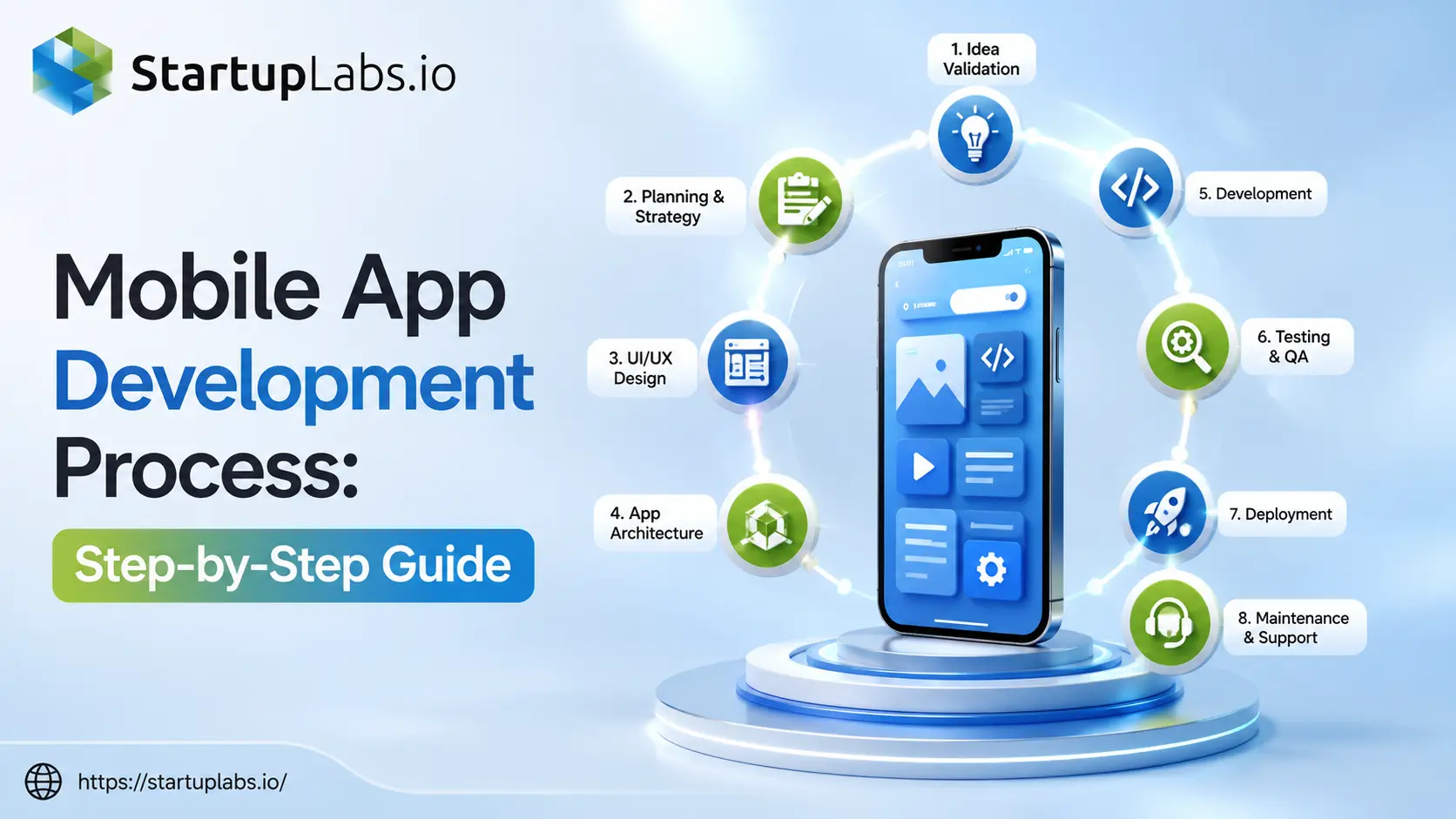
- What is the Mobile App Development Process?
- Why Following a Structured Development Process Matters
- Mobile App Development Lifecycle
- Mobile App Development Process Flow
- What Happens During Each Stage?
- Step 1: Idea Validation & Market Research
- Step 2: Planning & App Development Roadmap
- Step 3: UI/UX Design
- Step 4: Mobile App Architecture & Technology Stack
- Step 5: Frontend & Backend Development
- Step 6: Mobile App Testing & QA
- Step 7: Deployment & Launch
- Step 8: Post-Launch Maintenance
- Mobile App Development Timeline
- Deliverables at Every Stage
- Common Mobile App Development Mistakes to Avoid
- Conclusion
- FAQs
- August 10, 2026
Building a successful mobile app involves much more than writing code. Every high-performing application—whether it’s a startup MVP, an enterprise platform, or a customer-facing mobile product—follows a structured development process that minimizes risks, controls costs, and delivers a better user experience.
Unfortunately, many app projects fail because teams skip critical stages such as market research, proper planning, UI/UX design, or quality assurance. Even a great idea can struggle if it’s built without a clear roadmap.
The mobile app development process provides a proven framework that guides a project from the initial concept to launch and ongoing improvements. Each phase has a specific purpose, involves different specialists, and contributes to building an application that is secure, scalable, and ready for long-term growth.
In this guide, you’ll learn how professional development teams approach every stage of the mobile app development lifecycle—from validating an idea and choosing the right technology stack to designing intuitive interfaces, developing core features, testing for quality, deploying to app stores, and maintaining the product after launch.
If you’re new to this topic, we recommend starting with our What is Mobile App Development? (Beginner to Advanced Guide) to understand the fundamentals before exploring the complete development workflow.
Quick Answer:
The mobile app development process is a structured approach to building mobile applications, covering idea validation, planning, UI/UX design, architecture, development, testing, deployment, and post-launch maintenance. Following this process helps businesses reduce development risks, improve app quality, control costs, and deliver secure, scalable, and user-friendly applications.
What is the Mobile App Development Process?
The mobile app development process is a structured framework used to plan, design, build, test, launch, and maintain mobile applications. Rather than treating app development as a single coding task, it divides the project into well-defined stages, allowing teams to make informed decisions, reduce development risks, and deliver high-quality software.
A professional development process typically includes:
- Business and market research
- Product planning
- UI/UX design
- Mobile app architecture
- Frontend and backend development
- Quality assurance and testing
- Deployment to app stores
- Continuous maintenance and feature improvements
Each stage builds on the previous one. Skipping or rushing a phase can lead to costly redesigns, security issues, poor performance, or an application that doesn’t meet user expectations.
For businesses, following a structured development process improves collaboration between stakeholders, designers, developers, testers, and project managers while ensuring that the final product aligns with business objectives.
Why Following a Structured Development Process Matters
A structured development process is not just a project management practice—it directly impacts the success of your mobile application.
Businesses that follow a defined workflow are more likely to:
- Deliver projects on schedule
- Stay within development budgets
- Reduce costly revisions
- Improve application performance
- Build scalable architectures
- Launch with fewer defects
- Increase customer satisfaction
- Simplify future maintenance and feature updates
Professional software teams also use structured methodologies such as Agile and Scrum to continuously improve the application while responding to user feedback throughout development.
Mobile App Development Lifecycle
The mobile app development lifecycle refers to the complete journey of an application, from the initial business idea to ongoing maintenance after launch. Each phase has a unique objective and contributes to delivering a secure, scalable, and user-friendly mobile application.
Unlike a one-time project, mobile applications continue evolving after launch through updates, new features, performance improvements, and security enhancements.
Below is a simplified overview of the lifecycle.
| Stage | Primary Goal | Key Deliverable |
|---|---|---|
| Idea Validation | Validate business idea | Product Vision |
| Planning | Define roadmap | Project Plan |
| UI/UX Design | Design user experience | Wireframes & Prototype |
| Architecture | Select technologies | Technical Architecture |
| Development | Build application | Working Mobile App |
| Testing | Ensure quality | QA Approved Build |
| Deployment | Publish application | Live App |
| Maintenance | Improve continuously | Updates & Enhancements |
Mobile App Development Process Flow
Every successful application typically follows this sequence:
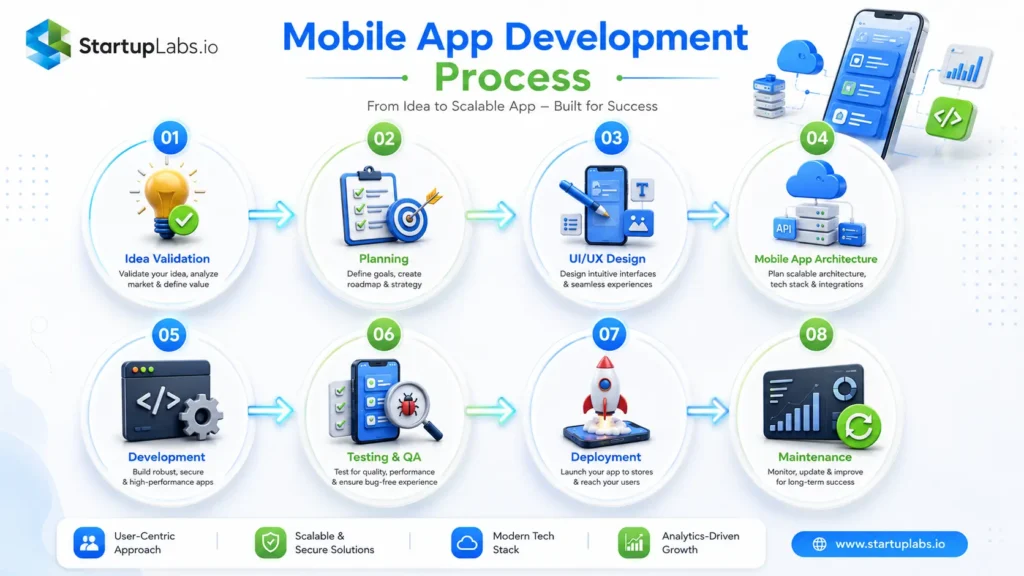
This workflow helps development teams move systematically from concept to launch while maintaining quality at every stage.
What Happens During Each Stage?
Although every project is unique, professional mobile app development companies generally follow the same high-level workflow. Each stage focuses on solving a specific problem before moving to the next one.
In the following sections, we’ll examine each phase in detail, including:
- The objective of the stage
- Activities performed by the team
- Expected deliverables
- Common mistakes to avoid
- Best practices followed by experienced development teams
By understanding what happens at every step, businesses can make informed decisions, communicate more effectively with development partners, and significantly improve the chances of building a successful mobile application.
Step 1: Idea Validation & Market Research
Every successful mobile app begins with solving a real user problem. Before development starts, businesses should validate the idea through market research, competitor analysis, and audience research. This helps identify user needs, prioritize essential features, and reduce the risk of building an app that lacks demand.
Objective
Validate the app idea and define the product vision.
Activities
- Market research
- Competitor analysis
- User persona creation
- Feature prioritization
- Business goal definition
Deliverables
- Product vision
- User personas
- Feature list
- Market research report
Best Practice
Start with an MVP to validate your idea before investing in advanced features.
Expert Insight
One of the biggest reasons mobile app projects fail is building a solution before validating the actual problem. Experienced product teams spend time understanding user needs and market demand first, helping reduce development risks and ensuring the final product solves a genuine business challenge.
Step 2: Planning & App Development Roadmap
After validating the idea, the project moves into planning. This stage defines the project scope, timeline, budget, technology approach, and development roadmap. Proper planning helps reduce delays, manage costs, and align stakeholders before development begins.
Objective
Create a structured roadmap for the project.
Activities
- Scope definition
- Timeline estimation
- Budget planning
- Sprint planning
- Risk assessment
Deliverables
- PRD
- Project roadmap
- Timeline
- Budget estimate
Best Practice
Prioritize business goals over feature quantity to avoid scope creep.
Expert Insight
Scope creep is one of the most common causes of delayed and over-budget projects. Successful teams define a clear roadmap, prioritize core features, and manage changes through structured sprint planning instead of continuously expanding project requirements.
Step 3: UI/UX Design
UI/UX design transforms business requirements into intuitive user experiences. Designers create user flows, wireframes, prototypes, and high-fidelity interfaces that improve usability, accessibility, and engagement before development starts.
Objective
Design an intuitive and user-friendly mobile application.
Activities
- User flow creation
- Wireframing
- Prototyping
- UI design
- Usability testing
Deliverables
- Wireframes
- Interactive prototype
- Design system
- UI assets
Best Practice
Validate designs with real users before development begins.
Expert Insight
Great mobile app design is about solving user problems, not just creating attractive screens. Teams that validate prototypes with real users early often identify usability issues before development begins, reducing expensive design changes later.
Step 4: Mobile App Architecture & Technology Stack
Architecture planning defines how the frontend, backend, APIs, databases, and cloud infrastructure work together. Choosing the right technology stack ensures scalability, security, and long-term maintainability.
Objective
Build a scalable technical foundation.
Activities
- Architecture design
- Database planning
- API planning
- Technology selection
- Cloud planning
Deliverables
- Architecture document
- Database schema
- API documentation
- Tech stack selection
Best Practice
Choose technologies based on business requirements rather than trends.
Expert Insight
A scalable architecture saves significant time and cost as an application grows. Investing in the right technical foundation early helps avoid major rework when adding new features, supporting more users, or integrating third-party services.
Step 5: Frontend & Backend Development
During development, the design is converted into a functional application. Frontend developers build the user interface, while backend developers implement business logic, APIs, databases, authentication, and integrations.
Objective
Develop a secure, scalable, and functional application.
Activities
- Frontend development
- Backend development
- API integration
- Database implementation
- Security implementation
Deliverables
- Functional application
- Backend APIs
- Admin panel
- Source code
Best Practice
Use Agile development with regular sprint reviews and code reviews.
Expert Insight
High-quality software isn’t measured by the amount of code written—it’s measured by maintainability, performance, and reliability. Experienced development teams prioritize clean architecture, code reviews, and reusable components to support long-term product growth.
Step 6: Mobile App Testing & QA
Mobile app testing services ensures the application works correctly across different devices and operating systems. A comprehensive QA process improves reliability, performance, security, and user experience before launch.
Objective
Deliver a stable and bug-free application.
Activities
- Functional testing
- Performance testing
- Security testing
- Compatibility testing
- Regression testing
Deliverables
- QA report
- Bug report
- Security assessment
- Release approval
Best Practice
Test continuously throughout development instead of only before launch.
Expert Insight
Testing should be integrated throughout the development lifecycle rather than treated as the final step. Continuous testing helps identify issues early, reducing development costs and improving release quality before the application reaches users.
Step 7: Deployment & Launch
Deployment involves publishing the application to the Google Play Store and Apple App Store after final quality checks. It also includes production setup, App Store Optimization (ASO), analytics configuration, and launch monitoring.
Objective
Release the application successfully.
Activities
- Production deployment
- App Store submission
- Google Play submission
- ASO optimization
- Analytics setup
Deliverables
- Published application
- Store listing
- Release notes
- Analytics dashboard
Best Practice
Monitor crashes and user feedback immediately after launch.
Expert Insight
Launching an application is the beginning of its product journey, not the end. Monitoring user behavior, crash reports, and customer feedback during the first few weeks after release provides valuable insights for future updates and product improvements.
Step 8: Post-Launch Maintenance
The development process continues after launch through regular updates, bug fixes, security improvements, performance optimization, and feature enhancements. Continuous maintenance helps keep the application secure, compatible, and competitive.
Objective
Maintain and improve the application over time.
Activities
- Bug fixes
- Performance monitoring
- Feature updates
- Security patches
- User feedback analysis
Deliverables
- Updated releases
- Performance reports
- Analytics reports
- Security updates
Best Practice
Use analytics and customer feedback to guide future improvements.
Expert Insight
The most successful mobile applications continue evolving after launch. Regular updates, security improvements, and feature enhancements help maintain user engagement, improve app store ratings, and keep the product competitive in a rapidly changing market.
Mobile App Development Timeline
Every project is unique, but the table below provides a general estimate for a typical business application.
| Development Stage | Estimated Duration |
|---|---|
| Idea Validation & Research | 1–2 Weeks |
| Planning & Roadmap | 1 Week |
| UI/UX Design | 2–4 Weeks |
| Architecture Planning | 1 Week |
| Frontend & Backend Development | 8–16 Weeks |
| Mobile App Testing & QA | 2–4 Weeks |
| Deployment & Launch | 1 Week |
| Post-Launch Maintenance | Ongoing |
Note: Timelines vary depending on application complexity, integrations, compliance requirements, and team size.
Deliverables at Every Stage
| Stage | Primary Deliverables |
|---|---|
| Idea Validation | Market Research, User Personas, Feature List |
| Planning | PRD, Roadmap, Timeline, Budget |
| UI/UX Design | Wireframes, Prototype, Design System |
| Architecture | Technical Architecture, API Design, Database Schema |
| Development | Working Mobile App, Backend APIs, Admin Panel |
| Testing | QA Report, Bug Report, Security Assessment |
| Deployment | Published Application, Release Notes |
| Maintenance | Updates, Monitoring Reports, Performance Improvements |
Agile vs. Waterfall: Which Development Approach Is Better?
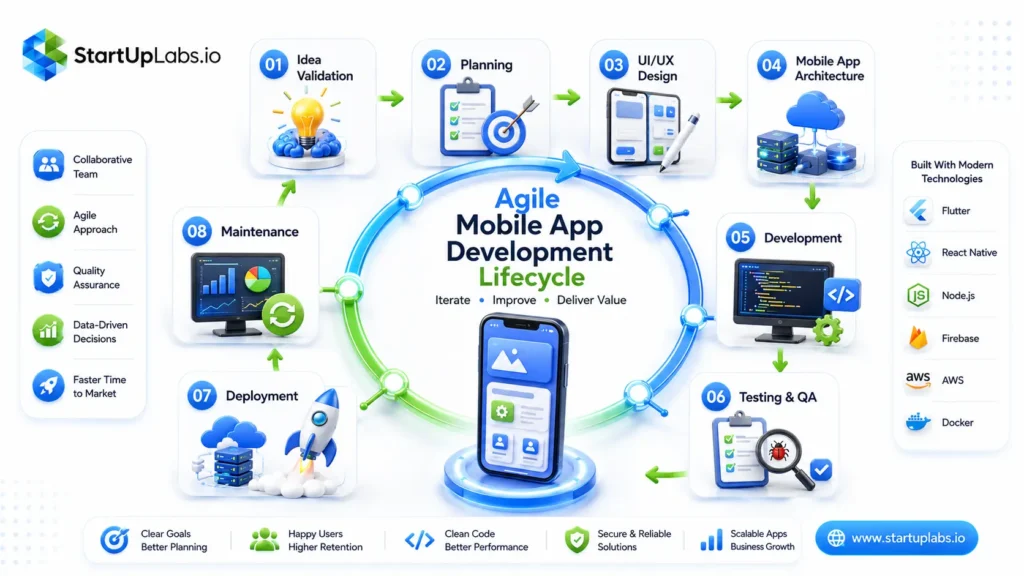
Most modern software companies use Agile because it supports iterative development, continuous feedback, and faster releases. However, some industries with strict documentation or regulatory requirements may still choose the Waterfall model.
| Feature | Agile | Waterfall |
|---|---|---|
| Flexibility | High | Low |
| Customer Feedback | Continuous | Limited |
| Feature Updates | Frequent | After Completion |
| Development Style | Iterative | Sequential |
| Best For | Startups, SaaS, Digital Products | Fixed-Scope Enterprise Projects |
For most mobile app projects in 2026, Agile is generally the preferred methodology due to its adaptability and ability to respond quickly to changing business needs.
Common Mobile App Development Mistakes to Avoid
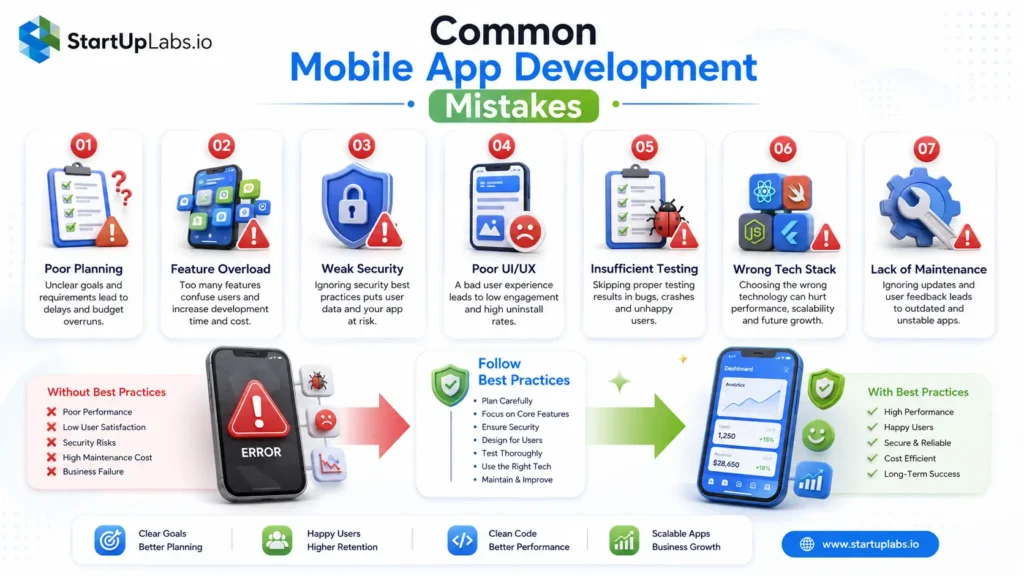
Even with a well-defined roadmap, mobile app projects can face delays, budget overruns, or poor user adoption if common mistakes are overlooked. Recognizing these challenges early helps businesses reduce risks and improve project outcomes.
1. Skipping Market Research
Many businesses rush into development without validating whether their idea solves a real user problem. Building an application based on assumptions rather than research often results in low adoption and unnecessary development costs.
Best Practice: Validate your idea through user interviews, competitor analysis, and market research before starting development.
2. Trying to Build Too Many Features
Adding every possible feature to the first release increases development time, complexity, and costs.
Best Practice: Focus on an MVP (Minimum Viable Product) with essential features and expand based on user feedback.
3. Choosing the Wrong Technology Stack
Selecting technologies based on popularity instead of project requirements can create scalability and maintenance challenges.
Best Practice: Evaluate business goals, expected traffic, integrations, performance requirements, and long-term scalability before selecting your technology stack.
4. Ignoring UI/UX Design
A feature-rich application with poor usability often struggles to retain users.
Best Practice: Invest in user research, wireframes, usability testing, and consistent design systems before development begins.
5. Inadequate Testing
Launching an application without comprehensive testing increases the risk of bugs, crashes, security vulnerabilities, and negative user reviews.
Best Practice: Combine manual testing, automation testing, performance testing, and real-device testing throughout the development lifecycle.
6. Neglecting Security
Mobile applications often handle sensitive user information, making security a critical requirement rather than an optional feature.
Best Practice: Implement secure authentication, encrypted communication, secure APIs, and regular security assessments from the beginning of the project.
7. Forgetting Post-Launch Maintenance
Launching an application without a maintenance strategy can quickly lead to compatibility issues, outdated features, and declining user satisfaction.
Best Practice: Plan for continuous monitoring, regular updates, and ongoing performance optimization.
Why Following the Right Mobile App Development Process Matters
A structured development process is more than a project management framework—it is the foundation of a successful digital product.
When every stage is planned and executed carefully, businesses can:
- Reduce project risks
- Control development costs
- Improve collaboration across teams
- Deliver better user experiences
- Build scalable and secure applications
- Launch with greater confidence
- Adapt more quickly to changing market needs
Whether you’re developing a startup MVP, an enterprise platform, or a consumer-facing mobile application, following a structured process significantly increases the likelihood of long-term success.
Conclusion
The mobile app development process is a strategic journey that transforms an idea into a fully functional, scalable, and user-focused application. From validating your concept and designing intuitive user experiences to building, testing, deploying, and maintaining the product, every phase contributes to the overall success of the application.
Skipping important stages may save time initially, but it often leads to higher costs, technical debt, security issues, and lower user satisfaction in the long run. By following a structured development lifecycle, businesses can reduce risks, improve product quality, and create applications that continue delivering value as user needs evolve.
If you’re planning to build an application, choosing experienced mobile app development services can help transform your idea into a secure, scalable, and high-performing digital product.
At StartUpLabs, we follow a proven mobile app development process that combines strategic planning, user-centered design, modern technologies, rigorous quality assurance, and continuous improvement to help businesses transform ideas into scalable digital products.
FAQs
1. What are the main stages of mobile app development?
Ans: The mobile app development process generally consists of eight key stages:
- Idea Validation & Market Research
- Project Planning
- UI/UX Design
- Mobile App Architecture
- Frontend & Backend Development
- Testing & Quality Assurance
- Deployment to App Stores
- Post-launch Maintenance
Each stage has a specific objective and contributes to delivering a secure, scalable, and user-friendly mobile application.
2. How long does the mobile app development process take?
Ans: The timeline depends on the application’s complexity, features, integrations, and development approach. A simple MVP may take 2–4 months, while a medium-sized business application typically requires 4–6 months. Large enterprise applications with advanced integrations, AI capabilities, or compliance requirements may take 6–12 months or longer. Proper planning and Agile development help keep projects on schedule.
3. What is mobile app architecture?
Ans: Mobile app architecture is the technical framework that defines how different parts of an application work together. It includes the frontend (user interface), backend services, APIs, databases, authentication, cloud infrastructure, and third-party integrations. A well-designed architecture improves application performance, security, scalability, and makes future updates easier to implement.
4. Which phase is the most important?
Ans: Every phase is important, but planning and idea validation often have the greatest impact on project success. Investing time in understanding user needs, validating the business idea, and defining project requirements helps reduce costly changes later in development. A strong foundation leads to better design decisions, smoother development, and fewer issues after launch.
5. Which phase takes the longest?
Ans: The development phase usually takes the longest because it involves building the frontend interface, backend services, APIs, databases, authentication systems, integrations, and business logic. Depending on the application’s complexity, this phase can account for 40–60% of the overall project timeline. Development is often completed in multiple Agile sprints with continuous testing and reviews.
6. Can AI improve the mobile app development process?
Ans: Yes. AI is increasingly used throughout the mobile app development lifecycle. Development teams use AI-powered tools for code generation, UI design suggestions, automated testing, bug detection, documentation, project estimation, and performance optimization. While AI accelerates many development tasks, experienced developers are still essential for architecture decisions, security, business logic, and quality assurance.
7. Why is testing important?
Ans: Testing ensures that a mobile application functions correctly across different devices, operating systems, and real-world usage scenarios. It helps identify bugs, security vulnerabilities, performance issues, and usability problems before launch. Continuous testing throughout development improves software quality, reduces post-release defects, and creates a better user experience.
Like This Blog? Share With Others

StartUpLabs Team
The StartUpLabs Team consists of technology and digital marketing experts passionate about helping businesses grow. We share industry insights and best practices in software development, AI, web and mobile solutions, and digital marketing.
Get Quote Now
Recent Post